"Engineers should use two columns. Marketers should use one. Designers should use whatever looks prettiest."
That's the kind of advice you'll find in every resume guide on the internet – confident, specific, and completely made up. Some articles even break it down by seniority level, as if switching from one column to two is a promotion perk you unlock at the 10-year mark.
The right column layout has nothing to do with your job title. It has everything to do with what's actually on your resume.
The advice you'll find everywhere (and why it's wrong)
Most resume guides tie layout to role. The logic goes something like:
- "Technical roles have dense skills sections → two columns"
- "Business roles are narrative-heavy → single column"
- "Creative roles should show design sense → two columns with flair"
This sounds reasonable until you think about it for a while. A junior frontend engineer with one job and three skills doesn't need two columns – they need to fill one. A marketing VP with 15 years of experience, six certifications, and three languages might genuinely benefit from two columns to fit it all on a page.
The role isn't the variable. The content is.
What actually determines the right layout
There are exactly two things that matter when choosing between one and two columns: what you need to fit and how it reads.
Choose two columns when:
- You have many short sections competing for space. Skills, certifications, languages, open source projects, tools – if your resume has five or six sections that are each 3–5 lines, two columns let you stack them efficiently instead of wasting vertical space.
- You're trying to fit a lot onto one page. Two columns give you roughly 40–60% more usable space on a single page. If you're a senior professional trying to keep it to one page, this is often the deciding factor.
- Your sidebar content is genuinely useful. Contact info, skills, languages, and certifications make natural sidebar material. If these sections add real value for your target roles, a two-column layout gives them a dedicated home without interrupting the flow of your experience.
Choose single column when:
- Your experience section does the heavy lifting. If your resume is 80% work experience with detailed bullet points, a single column lets each role breathe. Two columns would compress your best content into a narrow space.
- You have fewer sections. Contact info, summary, three jobs, education – that's it? Single column. There's nothing to put in a sidebar that wouldn't feel forced.
- You're early in your career. With one or two roles, a two-column layout often creates awkward whitespace. A single column looks intentional rather than empty.
Either works when:
- You have a balanced mix. Some narrative experience plus a reasonable skills section plus a few extra sections (education, certifications, languages). In this case, it genuinely comes down to personal preference and which version reads better when you look at the PDF.
What makes two-column layouts fail
Two-column resumes aren't inherently harder to read – but badly designed ones are. If you're leaning toward two columns, watch out for these:
- Making the sidebar too narrow. If your skills section is squeezed into a 30% column and every tool name wraps to two lines, you've made it worse, not better.
- Unbalanced column heights. If one column ends halfway down the page while the other runs to the bottom, the layout looks broken. Adjust your column split or move sections between columns.
- Too small a gap between columns. When columns are too close, the eye has trouble tracking which column it's reading. Give them breathing room.
- Using two columns on a two-page resume. Two columns on page one and a half-empty page two is worse than a clean single-column layout that uses both pages fully.
The ATS myth
You'll hear people say that single-column resumes are "more ATS-friendly." This was true a decade ago. Modern ATS software – Greenhouse, Lever, Workday, iCIMS – parses both layouts just fine. They read the text content, not the visual arrangement of boxes on a page.
What can trip up an ATS is text embedded in images, unusual file formats, or heavily designed resumes with graphics instead of actual text. But that's a design problem, not a column problem. A clean two-column PDF with real text content will parse just as well as a single-column one.
Real examples: same person, different layout
To make this concrete, here's how the same content can work in both layouts – and why one might fit better depending on what you have.
Scenario A: Senior engineer, 8 years, lots of short sections
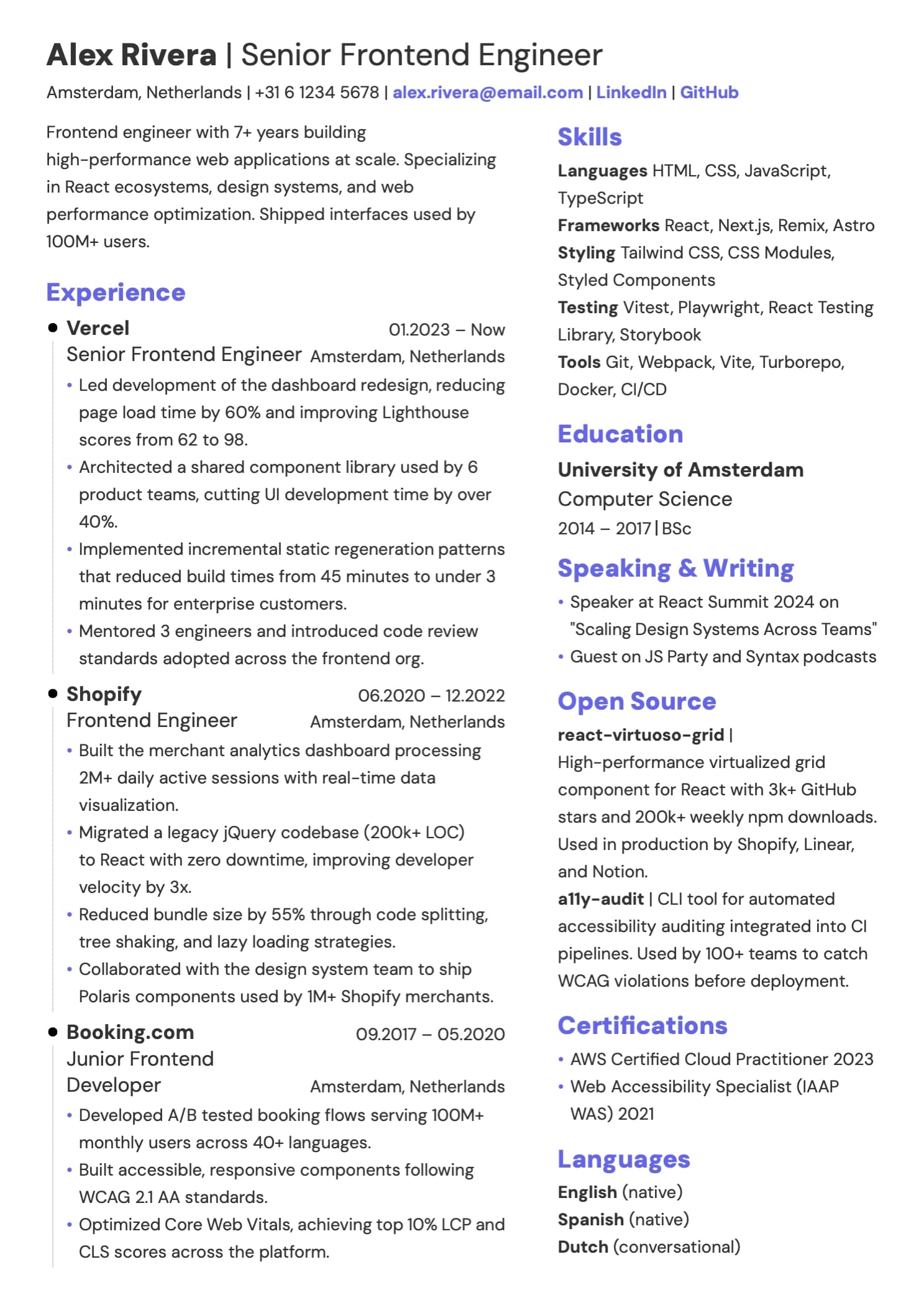
This person has: summary, 3 roles with detailed bullets, a skills section with 4 categories, open source contributions, certifications, education, and languages.
→ Two columns work better. The skills, certifications, open source, and languages can live in a sidebar. The experience section gets the full width of the main column. Everything fits on one page without shrinking the font to 9pt.
Scenario B: Marketing manager, 5 years, narrative-focused
This person has: summary, 2 roles with detailed achievements, education, and a short skills list.
→ Single column works better. There isn't enough sidebar content to justify a second column. A two-column layout would either leave the sidebar mostly empty or force the experience section into a narrow space.
Scenario C: Product designer, 6 years, balanced mix
This person has: summary, 3 roles, skills (tools + methods), a portfolio link, awards, and education.
→ Either works. They could go two-column with skills and awards in a sidebar, or single-column with everything stacked. The deciding factor is personal taste and how the final PDF looks.
How this connects to tailoring
Here's something most layout guides miss entirely: if you're tailoring your resume for each application, your content changes between versions. And if your content changes, the optimal layout might change too.
Your master CV might have 20 skills, 5 roles, certifications, and open source projects – a natural fit for two columns. But when you tailor it for a specific role and the AI trims it down to the most relevant 10 skills and 3 roles, suddenly single column might read better.
This is why it's worth picking a layout that works for the volume of content you typically end up with after tailoring, not just what's in your exhaustive master CV. Ideally, your resume builder lets you switch between layouts without rebuilding anything – so you can adjust the column split per version and see which reads better after each round of tailoring.
The bottom line
The one-column vs two-column debate is the wrong question. The right question is: what does my content need?
If you have lots of short sections and dense information, two columns use the space efficiently. If your resume is mostly experience with detailed bullet points, single column lets it breathe. If you're somewhere in between, try both and pick the one that reads better.
Your job title doesn't determine your layout. Your content does. And the best way to find out which works better is to look at your resume in both formats and trust your eyes.
Frequently asked questions
Do ATS systems reject two-column resumes?
No. Modern ATS software (Greenhouse, Lever, Workday) parses both layouts from clean PDFs. What causes problems is text embedded in images or unusual file formats – not the number of columns.
Should a one-page resume be one or two columns?
Either can work on one page. Two columns give you more usable space if you have many short sections to fit. Single column is better if your content is mostly detailed experience bullet points. The page count doesn't determine the layout – the content does.
Is a two-column resume unprofessional?
Not at all. A well-designed two-column resume looks clean and organized. What looks unprofessional is a badly balanced layout – cramped sidebars, uneven columns, or tiny fonts used to force everything into two columns.
Which layout is better for a career change?
If you're highlighting transferable skills and certifications to compensate for less directly relevant experience, two columns can help by giving those sections prominent sidebar placement. If your experience section tells the story of your transition, single column lets that narrative flow.